Building a Currency Conversion Workflow with LangChain + LangGraph + Gemini 2.5
Introduction
In modern application development, Large Language Models (LLMs) are not just used for chatbots — they can also be integrated into business workflows.
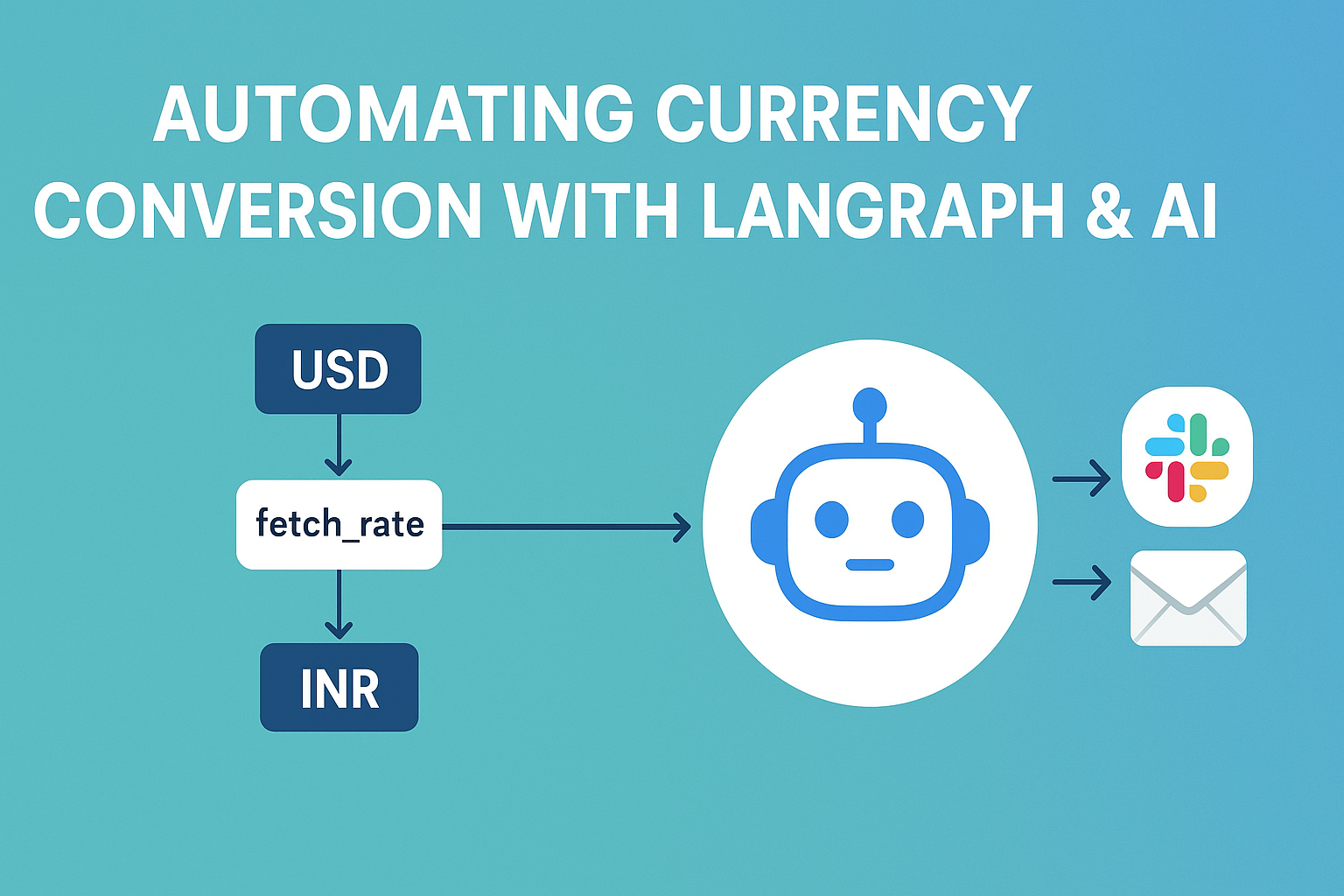
In this tutorial, we’ll build a currency conversion workflow that:
- Fetches USD → INR exchange rates from an API
- Converts an amount in USD to INR
- Summarizes the result using Google Gemini 2.5 Pro
- Simulates sending the result to Slack and Email
- Generates a visual workflow diagram using Mermaid
We’ll implement this using LangChain and LangGraph, two libraries that make it easy to design and run workflows involving AI models.
What is LangChain?
LangChain is a popular framework for working with LLMs.
It provides ready-made components for:
- Connecting to different AI models (e.g., OpenAI, Google Gemini, Anthropic)
- Chaining together multiple AI calls
- Integrating with tools, APIs, and databases
Instead of writing raw prompts and handling responses manually, LangChain gives a structured way to orchestrate LLM-powered logic.
What is LangGraph?
LangGraph builds on LangChain to provide graph-based workflows for AI and non-AI tasks.
- Each node in the graph is a function (like fetching data or sending an email).
- Edges define how data flows between nodes.
- You can parallelize or branch logic easily.
This is very useful when you want clear, maintainable workflows instead of large “spaghetti” functions.
Why Use LangGraph Over Regular Code?
You might wonder: Why not just write normal JavaScript functions in sequence?
The main advantages of LangGraph are:
- Visual Thinking – You can easily visualize the process as a diagram (great for team communication).
- Modularity – Each task is a self-contained node that’s easy to replace or extend.
- AI Integration – It’s built to work with LLMs, so prompt handling and async execution are smooth.
- Error Handling – Failures in one node don’t crash the entire workflow if handled correctly.
- Parallel Execution – Some steps (like sending to Slack & Email) can happen simultaneously.
In large projects, this architecture keeps the codebase clean and scalable.
Purpose of This Example
Our example demonstrates how to integrate LLMs into a practical business workflow.
It’s not just about “talking” to AI — it’s about using AI as one part of a larger automated process.
This workflow will:
- Use Zod to validate data types
- Fetch live exchange rates from Exchangerate API
- Do currency conversion
- Summarize results using Gemini 2.5 Pro
- Send notifications (Slack + Email)
- Generate a Mermaid diagram of the workflow
tep-by-Step Implementation
1. Install Dependencies
npm init -y
npm install @langchain/langgraph langchain axios zod dotenv fs @google/generative-ai
2. Create .env File
API_KEY=your_exchangerate_api_key
GEMINI_API_KEY=your_gemini_api_key
3. Full JavaScript Code
import { z } from "zod";
import axios from "axios";
import fs from "fs";
import dotenv from "dotenv";
dotenv.config();
import { StateGraph, START, END } from "@langchain/langgraph";
import { GoogleGenerativeAI } from "@google/generative-ai";

// Define state schema
const schema = z.object({
  amount_usd: z.number(),
  rate: z.number().optional(),
  total_inr: z.number().optional(),
  ai_summary: z.string().optional(),
  slack_status: z.string().optional(),
  email_status: z.string().optional(),
});

const graph = new StateGraph(schema);

// Fetch USD→INR rate
async function fetchRate(state) {
  try {
    const res = await axios.get("https://api.exchangerate.host/live?access_key=" + process.env.API_KEY);
    const rate = res?.data?.quotes?.USDINR;
    if (typeof rate === "number") return { rate };
    throw new Error("Invalid rate from API");
  } catch (err) {
    console.error("API fetch failed:", err.message);
    return { rate: 85 }; // fallback
  }
}

// Convert USD to INR
function convertAmount(state) {
  return { total_inr: state.amount_usd * state.rate };
}

// Summarize with Gemini 2.5 Pro
async function summarize(state) {
  try {
    const genAI = new GoogleGenerativeAI(process.env.GEMINI_API_KEY);
    const model = genAI.getGenerativeModel({ model: "gemini-2.5-pro" });
    const prompt = `Summarize this conversion in one short sentence: USD ${state.amount_usd} at rate ${state.rate} equals INR ${state.total_inr}.`;
    const result = await model.generateContent(prompt);
    const ai_summary = result?.response?.candidates?.[0]?.content?.parts?.[0]?.text || "Conversion completed.";
    return { ai_summary };
  } catch (err) {
    console.error("Gemini API failed:", err.message);
    return { ai_summary: `USD ${state.amount_usd} at rate ${state.rate} = INR ${state.total_inr}.` };
  }
}

// Send to Slack
async function sendToSlack(state) {
  console.log("Slack:", state.ai_summary);
  return { slack_status: "sent" };
}

// Send Email
async function sendEmail(state) {
  console.log("Email:", state.ai_summary);
  return { email_status: "sent" };
}

// Build workflow
graph.addNode("fetch_rate", fetchRate);
graph.addNode("convert_amount", convertAmount);
graph.addNode("summarize", summarize);
graph.addNode("send_slack", sendToSlack);
graph.addNode("send_email", sendEmail);

graph.addEdge(START, "fetch_rate");
graph.addEdge("fetch_rate", "convert_amount");
graph.addEdge("convert_amount", "summarize");
graph.addEdge("summarize", "send_slack");
graph.addEdge("summarize", "send_email");
graph.addEdge("send_slack", END);
graph.addEdge("send_email", END);

// Run workflow
const workflow = graph.compile();
const result = await workflow.invoke({ amount_usd: 100 });
console.log("\nFinal State:", result);

// Generate Mermaid diagram
const edges = [
  { from: "START", to: "fetch_rate" },
  { from: "fetch_rate", to: "convert_amount" },
  { from: "convert_amount", to: "summarize" },
  { from: "summarize", to: "send_slack" },
  { from: "summarize", to: "send_email" },
  { from: "send_slack", to: "END" },
  { from: "send_email", to: "END" },
];
let mermaid = "graph TD\n";
for (const e of edges) mermaid += `  ${e.from} --> ${e.to}\n`;
fs.writeFileSync("graph.mmd", mermaid);
console.log("\n📊 Mermaid diagram saved to graph.mmd (paste into https://mermaid.live)");
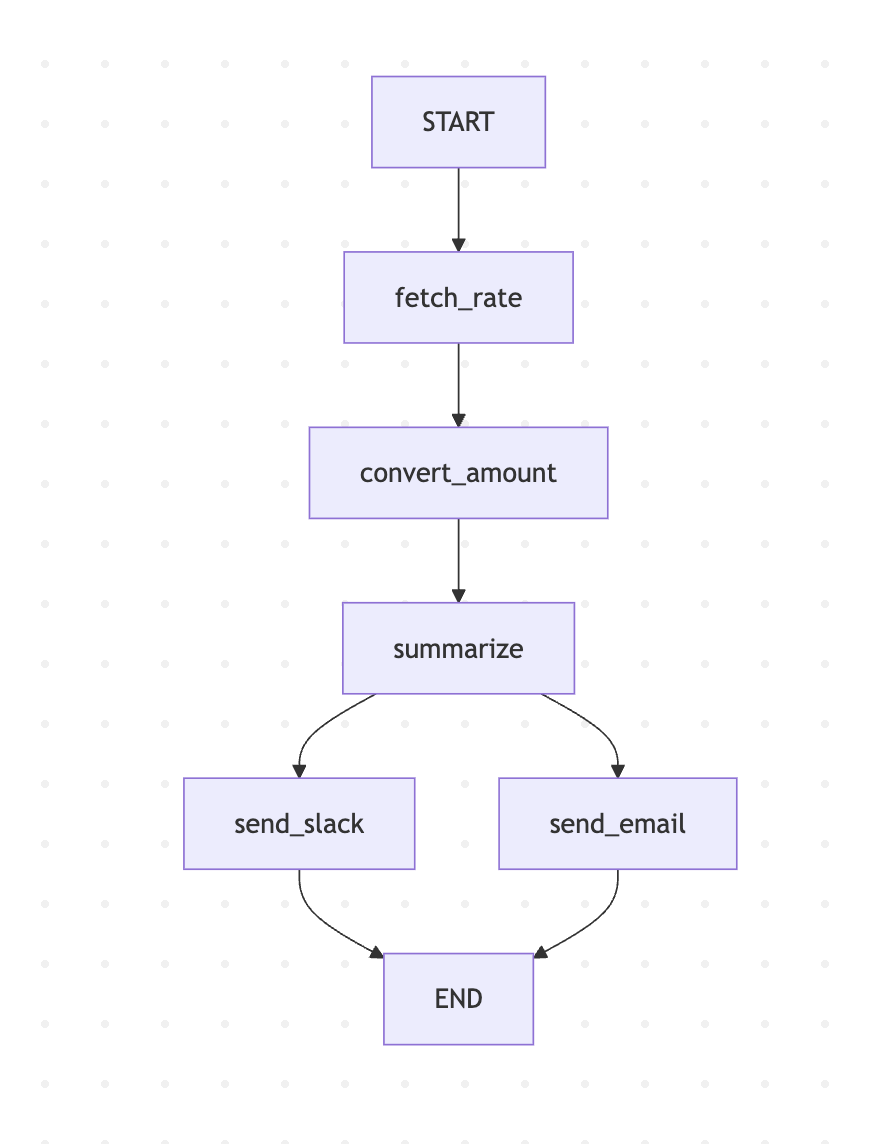
Mermaid Diagram of Workflow
The above code generates a graph.mmd file you can paste into Mermaid Live Editor:
graph TD
  START --> fetch_rate
  fetch_rate --> convert_amount
  convert_amount --> summarize
  summarize --> send_slack
  summarize --> send_email
  send_slack --> END
  send_email --> END
Key Takeaways
- LangChain + LangGraph make it easy to design modular AI workflows.
- Zod ensures data integrity between workflow steps.
- Gemini 2.5 Pro adds natural language summaries to your business process.
- Visual diagrams improve clarity and communication in teams.
With this setup, you can extend the workflow to handle more currencies, real notifications, or even integrate directly with payment systems.
Full code is available at Github https://github.com/110059/ai-lanchain-langgraph