Spring Boot Microservices Caching with Redis : Microservices Essentials
Learn how to implement Redis caching in Spring Boot microservices. Includes a complete working example with step-by-step guide, TTL, cache eviction, and performance boost.
This post includes
✅ How to cache data in Spring Boot microservices
✅ How to use Redis as a distributed cache
✅ How to implement TTL (time-to-live), eviction, and lazy caching
✅ How caching improves performance
What is Redis?
Redis (REmote DIctionary Server) is a fast in-memory database. It stores data in RAM (not hard disk), so it’s super fast — perfect when speed really matters.
What is it used for?
- Caching (store frequently-used data temporarily) Like saving search results so you don’t fetch them again.
- Session storage Like storing login sessions of users.
- Queues & messaging Great for background tasks or real-time messaging.
- Supports real-time messaging via publish-subscribe (Pub-Sub)
- Leaderboard / counters / real-time analytics Super fast for counting likes, scores, etc.
Project Structure
springboot-redis-cache/
├── product-service/
│   ├── src/main/java/com/example/product/
│   └── application.properties
└── docker-compose.yml  (for Redis)
Step 1: Setup Redis with Docker
docker-compose.yml
version: '3'
services:
  redis:
    image: redis:7.2-alpine
    container_name: redis
    ports:
      - "6379:6379"
✅ Start Redis:
docker compose upStep 2: Create product-service
This service ia going to cover :
- Expose REST endpoints
- Use Redis to cache product data
- Fetch from cache if available
- Fetch from database if cache is missing (simulated)
pom.xml
<dependencies>
    <dependency>
        <groupId>org.springframework.boot</groupId>
        <artifactId>spring-boot-starter-web</artifactId>
    </dependency>

    <dependency>
        <groupId>org.springframework.boot</groupId>
        <artifactId>spring-boot-starter-data-redis</artifactId>
    </dependency>

    <dependency>
        <groupId>org.springframework.boot</groupId>
        <artifactId>spring-boot-starter-cache</artifactId>
    </dependency>

    <dependency>
        <groupId>org.springframework.boot</groupId>
        <artifactId>spring-boot-devtools</artifactId>
        <scope>runtime</scope>
    </dependency>
<dependency>
  <groupId>org.projectlombok</groupId>
  <artifactId>lombok</artifactId>
  <version>1.18.30</version>
  <scope>provided</scope>
 </dependency>
</dependencies>
application.properties
server.port=8080

# Redis config
spring.cache.type=redis
spring.redis.host=localhost
spring.redis.port=6379
Step 3: Enable Caching in Spring Boot
📄 ProductServiceApplication.java
@SpringBootApplication
@EnableCaching
public class ProductServiceApplication {
    public static void main(String[] args) {
        SpringApplication.run(ProductServiceApplication.class, args);
    }
}
Description
@EnableCachingtells Spring to activate the caching mechanism.
Step 4: Create Product Entity & Service
We simulate a product database using a Map.
📄 Product.java
@Getter @Setter
public class Product {
    private String id;
    private String name;
    private double price;
}
ProductService.java
@Service
public class ProductService {

    private static final Map<String, Product> PRODUCT_DB = Map.of(
        "p101", new Product("p101", "Laptop", 90000),
        "p102", new Product("p102", "Keyboard", 1500)
    );

    @Cacheable(value = "products", key = "#productId")
    public Product getProductById(String productId) {
        simulateSlowService();
        return PRODUCT_DB.get(productId);
    }

    private void simulateSlowService() {
        try {
            Thread.sleep(3000); // Simulate slow DB call
        } catch (InterruptedException e) {
            Thread.currentThread().interrupt();
        }
    }
}
Description
@Cacheable: caches the result. Next time, result is fetched from Redis, not method.value = "products": cache namekey = "#productId": key for this cache entry- First call = slow, future calls = instant (cached!)
Step 5: Expose Product API
📄 ProductController.java
@RestController
@RequestMapping("/api/products")
public class ProductController {

    private final ProductService service;

    public ProductController(ProductService service) {
        this.service = service;
    }

    @GetMapping("/{id}")
    public ResponseEntity<Product> getProduct(@PathVariable String id) {
        Product product = service.getProductById(id);
        if (product != null)
            return ResponseEntity.ok(product);
        else
            return ResponseEntity.notFound().build();
    }
}
Step 6: Add Cache Eviction (Optional)
📄 In ProductService.java
@CacheEvict(value = "products", key = "#productId")
public void evictProductCache(String productId) {
    System.out.println("Product cache evicted for: " + productId);
}
Call this after product update/delete to avoid stale data.
Step 7: Configure TTL (Time-To-Live)
By default, Redis stores cache forever unless specified.
📄 RedisConfig.java
@Configuration
public class RedisConfig {

    @Bean
    public RedisCacheManager cacheManager(RedisConnectionFactory connectionFactory) {
        RedisCacheConfiguration config = RedisCacheConfiguration.defaultCacheConfig()
            .entryTtl(Duration.ofMinutes(10)) // TTL 10 minutes
            .disableCachingNullValues();

        return RedisCacheManager.builder(connectionFactory)
            .cacheDefaults(config)
            .build();
    }
}
Testing
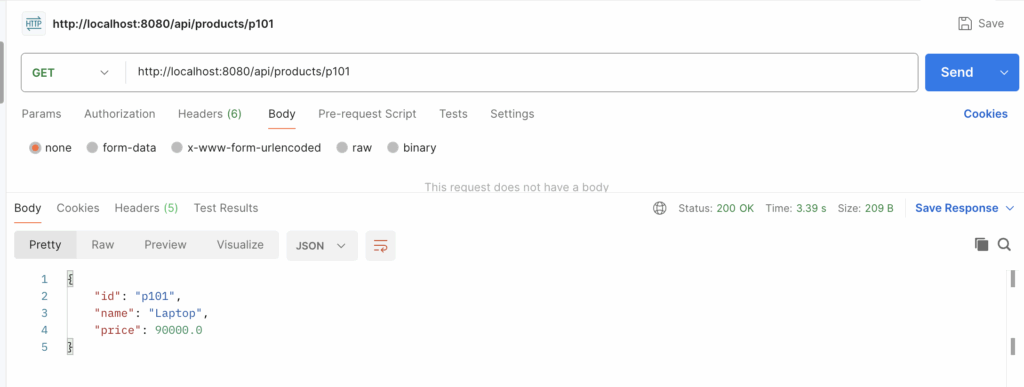
✅ First Call (slow)
GET http://localhost:8080/api/products/p101- Takes 3 seconds (simulated DB)
- Result is cached in Redis
initially it is taking 3 second to get the result.
✅ Second Call (fast)
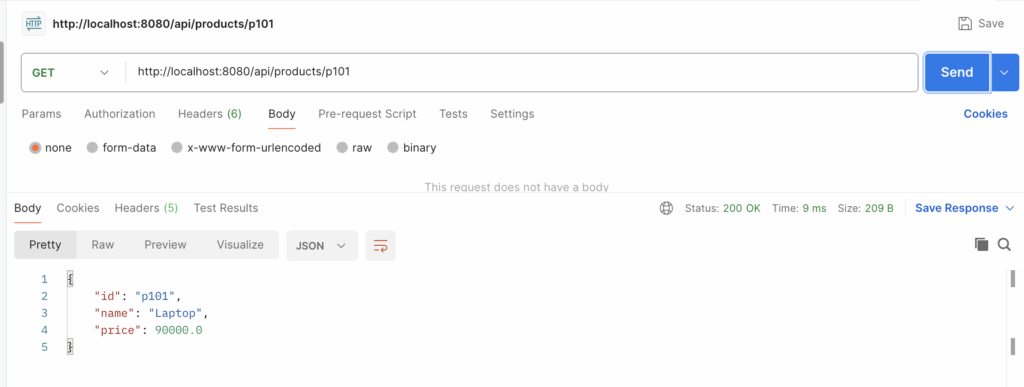
GET http://localhost:8080/api/products/p101- Returns instantly (from Redis). second time getting data from redis, that is why it is only taking 9 second.
✅ Evict Cache
productService.evictProductCache("p101");Verify Redis Cache
Connect to Redis shell:
docker exec -it redis redis-cli
keys *
GET products::p101
You can clearly see cache has stored the data.
📘 Summary
| Feature | Technique |
|---|---|
| Caching | @Cacheable, @CacheEvict |
| Store | Redis |
| TTL | Custom via RedisCacheManager |
| Tooling | Docker, Spring Boot, Redis |
Git code : https://github.com/infotechseo/springboot-redis-cache

![Getting Started with Spring Boot [Java Spring Boot Mastery Series – Part 1]](https://seoinfotech.com/wp-content/uploads/2025/06/jav-spring-boot-mastery--300x200.png)