Build Spring Boot Microservices with HTTP and Kafka Communication : Microservices Essentials
In this article, we’ll create a microservices architecture using:
- HTTP Communication between UserService and OrderService (synchronous)
- Kafka Messaging between OrderService and NotificationService (asynchronous)
- Build everything from scratch with full working code.
- Run Kafka using Docker Compose.
What is Apache Kafka?
Apache Kafka is an open-source distributed event streaming platform used to build real-time data pipelines and streaming applications.
🔧 Kafka is Used For:
- Messaging system between microservices (decoupled communication)
- Real-time analytics (like fraud detection, monitoring)
- Log aggregation
- Stream processing (with Kafka Streams, ksqlDB)
- Event-driven architecture
💡 Key Concepts in Kafka:
| Component | Description |
|---|---|
| Producer | Sends (publishes) messages to Kafka topics |
| Consumer | Reads (subscribes) messages from Kafka topics |
| Topic | A named stream of data to which producers write and from which consumers read |
| Broker | A Kafka server that stores data and serves clients |
| Partition | A topic is split into partitions for scalability and parallel processing |
| Offset | A unique ID for each message in a partition (used to track read position) |
🐘 What is Zookeeper (in Kafka)?
Apache ZooKeeper is a centralized service for coordinating and managing distributed systems.
In Kafka, Zookeeper is used to:
- Manage Kafka cluster metadata
- Keep track of brokers (who is alive or dead)
- Handle leader election for partitions
- Manage topics, partitions, and configurations
🔗 Kafka and Zookeeper Relationship:
Kafka relies on ZooKeeper for its internal operations (until Kafka 2.8+ which offers optional “KRaft” mode to remove Zookeeper).
Without Zookeeper, Kafka:
- Would not know which broker is the leader for a partition
- Can’t maintain cluster state
- Can’t rebalance or handle failover automatically
📘 Real-Life Analogy:
| Element | Analogy |
|---|---|
| Kafka | Post Office (handles mail/messages) |
| Zookeeper | The central control room (keeps track of which postman does what, who’s active, and what rules apply) |
🔄 Transition: Kafka without Zookeeper?
As of Kafka 2.8.0+, Kafka can run without ZooKeeper using a new internal consensus system called KRaft (Kafka Raft Metadata mode) — this simplifies the architecture.
Summary:
| Kafka | Zookeeper |
|---|---|
| Message streaming system | Distributed coordination system |
| Producers send, consumers receive | Kafka uses it to manage state |
| Can scale horizontally | Maintains metadata, leader election |
| Can now run without Zookeeper (KRaft) | Optional in newer versions |
Project Structure
microservices-kafka-http/
├── user-service/
├── order-service/
├── notification-service/
├── docker-compose.yml (Kafka + Zookeeper)
user-service ➝ Sends HTTP requests to place orders.
order-service ➝ Receives HTTP requests and sends Kafka messages.
notification-service ➝ Consumes Kafka messages and prints notifications.
Step 1: Docker Setup for Kafka
Kafka needs Zookeeper to manage brokers. This docker-compose.yml file sets up both Kafka and Zookeeper locally. We expose Kafka on port 9092 so our services can connect to it.
docker-compose.yml
version: '3.8'
services:
  zookeeper:
    image: confluentinc/cp-zookeeper:7.5.0
    environment:
      ZOOKEEPER_CLIENT_PORT: 2181

  kafka:
    image: confluentinc/cp-kafka:7.5.0
    depends_on:
      - zookeeper
    ports:
      - "9092:9092"
    environment:
      KAFKA_BROKER_ID: 1
      KAFKA_ZOOKEEPER_CONNECT: zookeeper:2181
      KAFKA_ADVERTISED_LISTENERS: PLAINTEXT://localhost:9092
      KAFKA_OFFSETS_TOPIC_REPLICATION_FACTOR: 1
Run with:
docker compose upStep 2: user-service (HTTP Call Producer)
This service sends HTTP requests to the Order Service when a user places an order.
📁 Directory: user-service
📄 pom.xml
<dependencies>
    <dependency>
        <groupId>org.springframework.boot</groupId>
        <artifactId>spring-boot-starter-web</artifactId>
    </dependency>
</dependencies>
📄 application.properties
spring.application.name=user-serviceserver.port=8081
📄 UserController.java
When the user hits POST /api/users/{id}/orders, this controller sends an HTTP request to order-service. This simulates synchronous communication between services.
@RestController
@RequestMapping("/api/users")
public class UserController {

    private final RestTemplate restTemplate;

    public UserController(RestTemplateBuilder builder) {
        this.restTemplate = builder.build();
    }

    @PostMapping("/{userId}/orders")
    public String placeOrder(@PathVariable String userId) {
        String orderServiceUrl = "http://localhost:8082/api/orders/create";
        Map<String, String> request = Map.of("userId", userId);
        return restTemplate.postForObject(orderServiceUrl, request, String.class);
    }
}
Step 3: order-service (HTTP Consumer + Kafka Producer)
This service handles the incoming HTTP request and publishes a message to Kafka.
📁 Directory: order-service
📄 pom.xml
<dependencies>
    <dependency>
        <groupId>org.springframework.boot</groupId>
        <artifactId>spring-boot-starter-web</artifactId>
    </dependency>
    <dependency>
        <groupId>org.springframework.kafka</groupId>
        <artifactId>spring-kafka</artifactId>
    </dependency>
</dependencies>
📄 application.properties
server.port=8082
spring.kafka.bootstrap-servers=localhost:9092
spring.kafka.producer.key-serializer=org.apache.kafka.common.serialization.StringSerializer
spring.kafka.producer.value-serializer=org.apache.kafka.common.serialization.StringSerializer
📄 OrderController.java
This service receives the HTTP request from user-service, creates an order message, and sends it to a Kafka topic (order-topic). This decouples communication with notification-service.
@RestController
@RequestMapping("/api/orders")
public class OrderController {

    private final KafkaTemplate<String, String> kafkaTemplate;

    public OrderController(KafkaTemplate<String, String> kafkaTemplate) {
        this.kafkaTemplate = kafkaTemplate;
    }

    @PostMapping("/create")
    public ResponseEntity<String> createOrder(@RequestBody Map<String, String> payload) {
        String userId = payload.get("userId");
        String message = "Order placed by user: " + userId;

        kafkaTemplate.send("order-topic", message);

        return ResponseEntity.ok("Order created & event sent to Kafka");
    }
}
📄 OrderServiceApplication.java
@SpringBootApplication
public class OrderServiceApplication {
    public static void main(String[] args) {
        SpringApplication.run(OrderServiceApplication.class, args);
    }

    @Bean
    public KafkaTemplate<String, String> kafkaTemplate(ProducerFactory<String, String> pf) {
        return new KafkaTemplate<>(pf);
    }

    @Bean
    public ProducerFactory<String, String> producerFactory() {
        Map<String, Object> config = new HashMap<>();
        config.put(ProducerConfig.BOOTSTRAP_SERVERS_CONFIG, "localhost:9092");
        config.put(ProducerConfig.KEY_SERIALIZER_CLASS_CONFIG, StringSerializer.class);
        config.put(ProducerConfig.VALUE_SERIALIZER_CLASS_CONFIG, StringSerializer.class);
        return new DefaultKafkaProducerFactory<>(config);
    }
}
Step 4: notification-service (Kafka Consumer)
This service listens to order-topic and prints a notification when a message is received.
📁 Directory: notification-service
📄 pom.xml
<dependencies>
    <dependency>
        <groupId>org.springframework.kafka</groupId>
        <artifactId>spring-kafka</artifactId>
    </dependency>
    <dependency>
        <groupId>org.springframework.boot</groupId>
        <artifactId>spring-boot-starter</artifactId>
    </dependency>
</dependencies>
📄 application.properties
server.port=8083
spring.kafka.bootstrap-servers=localhost:9092
spring.kafka.consumer.group-id=notification-group
spring.kafka.consumer.auto-offset-reset=earliest
spring.kafka.consumer.key-deserializer=org.apache.kafka.common.serialization.StringDeserializer
spring.kafka.consumer.value-deserializer=org.apache.kafka.common.serialization.StringDeser
📄 NotificationServiceApplication.java
@SpringBootApplication
public class NotificationServiceApplication {
    public static void main(String[] args) {
        SpringApplication.run(NotificationServiceApplication.class, args);
    }
}
This service is a Kafka consumer. It listens to the order-topic and reacts when a new order is placed — like sending an email, SMS, or push notification.
Testing the Workflow
✅ Start Services in Order:
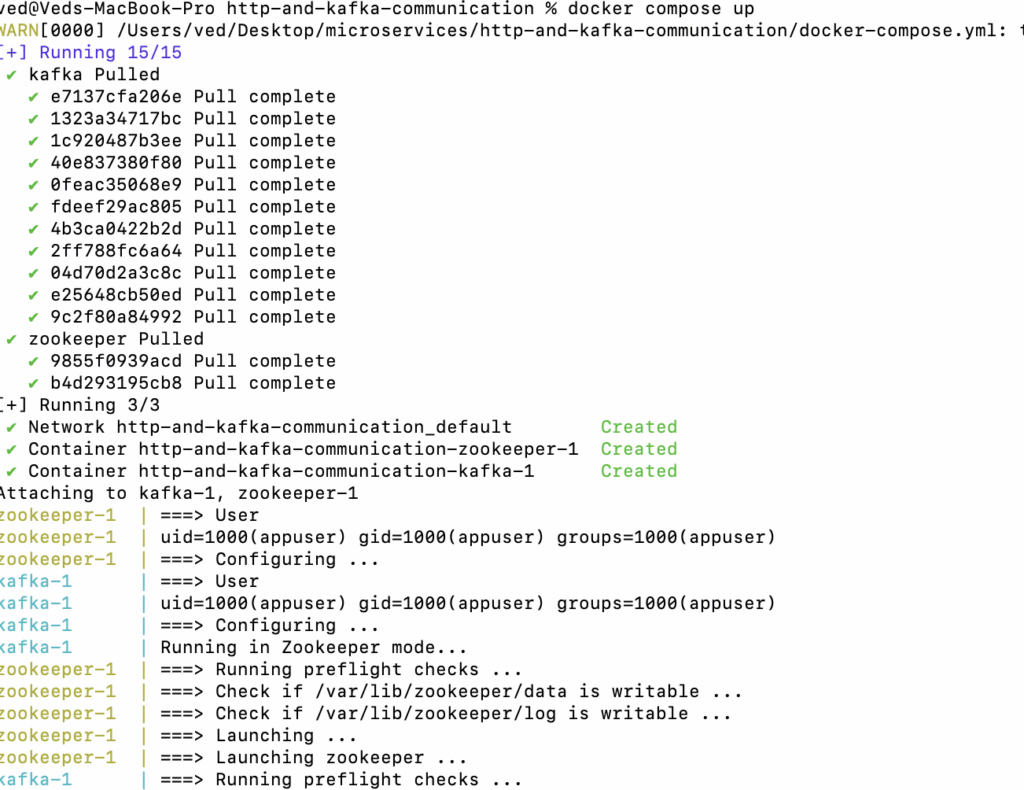
- Start Kafka via
docker-compose up.(docker compose up : for Mac)
- Run
notification-service - Run
order-service - Run
user-service
Trigger Request:
Send a POST request:
POST http://localhost:8081/api/users/101/orders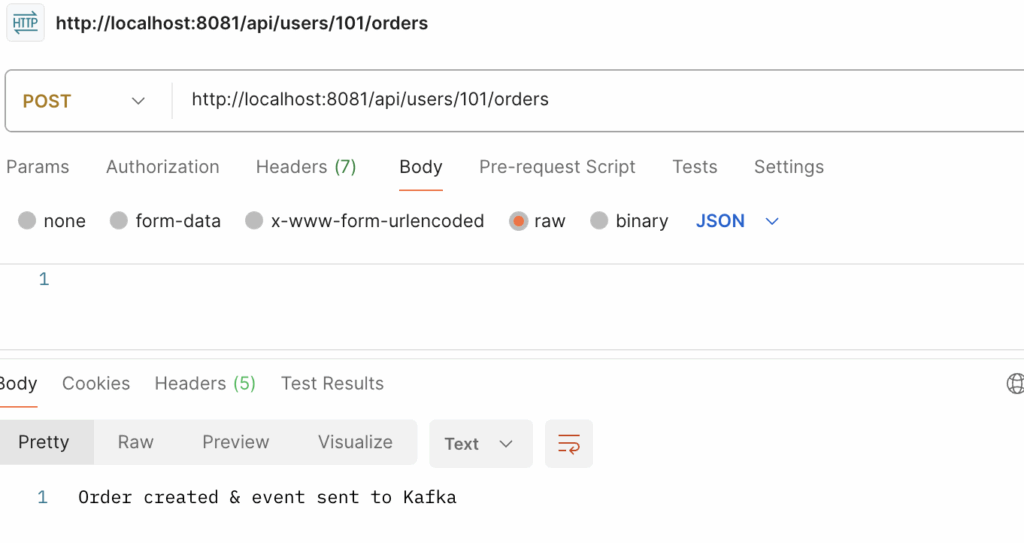
🧾 Output:
user-servicecallsorder-service(HTTP)order-servicesends message to Kafkanotification-servicereceives message and logs it
📘 Summary
| Service | Role | Communication |
|---|---|---|
| user-service | Triggers order creation | HTTP (sync) |
| order-service | Accepts orders & emits event | Kafka (async) |
| notification-service | Listens to Kafka events | Kafka (async) |
Github code : https://github.com/infotechseo/http-and-kafka-communication


![Java Spring Boot Mastery Series [Version : 2025-26]](https://seoinfotech.com/wp-content/uploads/2025/06/jav-spring-boot-mastery--300x200.png)