Spring Cloud Gateway: Building an API Gateway for Microservices (with Eureka) – Microservices Essentials
In a microservices architecture, each service usually has its own endpoint. Managing all these endpoints manually is tedious and error-prone. That’s where Spring Cloud Gateway steps in as a powerful, scalable, and simple solution for routing requests to various services via a single entry point.
In this article, you will:
Configure Spring Cloud Gateway to act as an intelligent router
Set up a Eureka Discovery Server
Register a User Service
API Gateway serves as the single entry point. It forwards client requests to appropriate services, handles
– Routing,
– Load-balancing,
– Authentication, and more.
Case: There is many microservices having different domain/ip/port, which one to call exactly it is very complex if we handle it manually. To resolve this api gateway comes into the picture.
We will build:
- ✅
eureka-server: Service registry - ✅
api-gateway: API Gateway with Spring Cloud Gateway - ✅
user-service: A simple microservice behind the gateway
🔧 Tech Stack
| Technology | Version ( use as per latest) |
|---|---|
| Spring Boot | 3.1.5 |
| Spring Cloud | 2022.0.4 |
| Java | 17 |
| Maven | Yes |
✅ Architecture Overview
               [ API Gateway (Spring Cloud Gateway) ]
                           |
         -----------------------------------------
         |                       |               |
 [User-Service]        [Order-Service]   [Other microservices...]
         |
   [Eureka Discovery Server (Registry)]
🗂️ Project Structure
microservices-eureka-server/
├── eureka-server/
├── api-gateway/
└── user-service/
1️⃣ Step 1: Eureka Discovery Server
📁 Project: eureka-server
📄 pom.xml
<project xmlns="http://maven.apache.org/POM/4.0.0"
         xmlns:xsi="http://www.w3.org/2001/XMLSchema-instance"
         xsi:schemaLocation="http://maven.apache.org/POM/4.0.0 https://maven.apache.org/xsd/maven-4.0.0.xsd">
    <modelVersion>4.0.0</modelVersion>

    <parent>
        <groupId>org.springframework.boot</groupId>
        <artifactId>spring-boot-starter-parent</artifactId>
        <version>3.0.1</version>
    </parent>

    <groupId>com.example</groupId>
    <artifactId>eureka-server</artifactId>
    <version>0.0.1-SNAPSHOT</version>
    <name>eureka-server</name>

    <properties>
        <java.version>17</java.version>
    </properties>

    <dependencies>
        <dependency>
            <groupId>org.springframework.cloud</groupId>
            <artifactId>spring-cloud-starter-netflix-eureka-server</artifactId>
        </dependency>
        <dependency>
            <groupId>org.springframework.boot</groupId>
            <artifactId>spring-boot-starter-web</artifactId>
        </dependency>
    </dependencies>

    <dependencyManagement>
        <dependencies>
            <dependency>
                <groupId>org.springframework.cloud</groupId>
                <artifactId>spring-cloud-dependencies</artifactId>
                <version>2022.0.4</version>
                <type>pom</type>
                <scope>import</scope>
            </dependency>
        </dependencies>
    </dependencyManagement>

    <build>
        <plugins>
            <plugin>
                <groupId>org.springframework.boot</groupId>
                <artifactId>spring-boot-maven-plugin</artifactId>
            </plugin>
        </plugins>
    </build>
</project>
Note:
Use <dependencyManagement> in a parent POM to avoid repeating versions in every child module.
Use <dependencies> when you want to add a library to your current module.
📄 EurekaServerApplication.java
package com.example.eurekaserver;

import org.springframework.boot.SpringApplication;
import org.springframework.boot.autoconfigure.SpringBootApplication;
import org.springframework.cloud.netflix.eureka.server.EnableEurekaServer;

@SpringBootApplication
@EnableEurekaServer
public class EurekaServerApplication {
    public static void main(String[] args) {
        SpringApplication.run(EurekaServerApplication.class, args);
    }
}
📄 application.properties
server.port=8761
spring.application.name=eureka-server

eureka.client.register-with-eureka=false
eureka.client.fetch-registry=false
➡️ Run this server and open http://localhost:8761 to see the Eureka dashboard.

2️⃣ Step 2: User Service (Microservice)
📁 Project: user-service
📄 pom.xml
Same setup as Eureka, but include the Eureka client.
<dependencies>
    <dependency>
        <groupId>org.springframework.cloud</groupId>
        <artifactId>spring-cloud-starter-netflix-eureka-client</artifactId>
    </dependency>
    <dependency>
        <groupId>org.springframework.boot</groupId>
        <artifactId>spring-boot-starter-web</artifactId>
    </dependency>
</dependencies>
📄 UserServiceApplication.java
package com.example.userservice;

import org.springframework.boot.SpringApplication;
import org.springframework.boot.autoconfigure.SpringBootApplication;

@SpringBootApplication
public class UserServiceApplication {
    public static void main(String[] args) {
        SpringApplication.run(UserServiceApplication.class, args);
    }
}
📄 UserController.java
com.example.userservice.controller;

import org.springframework.web.bind.annotation.GetMapping;
import org.springframework.web.bind.annotation.RestController;

@RestController
public class UserController {

    @GetMapping("/users")
    public String getUsers() {
        return "User service response";
    }
}
📄 application.properties
server.port=8081
spring.application.name=user-service

eureka.client.service-url.defaultZone=http://localhost:8761/eureka
➡️ Run this server and open http://localhost:8081 .
3️⃣ Step 3: API Gateway (Spring Cloud Gateway)
📁 Project: api-gateway
📄 pom.xml
<dependency>
	<groupId>org.springframework.cloud</groupId>
	<artifactId>spring-cloud-starter-netflix-eureka-client</artifactId>
</dependency>

<!-- ✅ Correct Gateway dependency -->
<dependency>
	<groupId>org.springframework.cloud</groupId>
	<artifactId>spring-cloud-starter-gateway-server-webmvc</artifactId>
</dependency>
📄 ApiGatewayApplication.java
package com.example.apigateway;

import org.springframework.boot.SpringApplication;
import org.springframework.boot.autoconfigure.SpringBootApplication;

@SpringBootApplication
public class ApiGatewayApplication {
    public static void main(String[] args) {
        SpringApplication.run(ApiGatewayApplication.class, args);
    }
}
📄 application.properties
spring.application.name=api-gateway
server.port=8080

# Register this service with Eureka
eureka.client.service-url.defaultZone=http://localhost:8761/eureka

#  Required for reactive Spring Gateway (to avoid auto-detection of MVC)
spring.main.web-application-type=reactive

# (Optional) Gateway route example
spring.cloud.gateway.routes[0].id=user-service
spring.cloud.gateway.routes[0].uri=http://localhost:8081
spring.cloud.gateway.routes[0].predicates[0]=Path=/users/**
lb://user-servicemeans the request will be load balanced to the registered service via Eureka.
🧪 Testing Everything
- Start
eureka-server(localhost:8761) - Start
user-service(localhost:8081) → should show up on Eureka dashboard - Start
api-gateway(localhost:8080) - Open: http://localhost:8080/users → should return
"User service response"via gateway

discovery server / eureka showing both services:
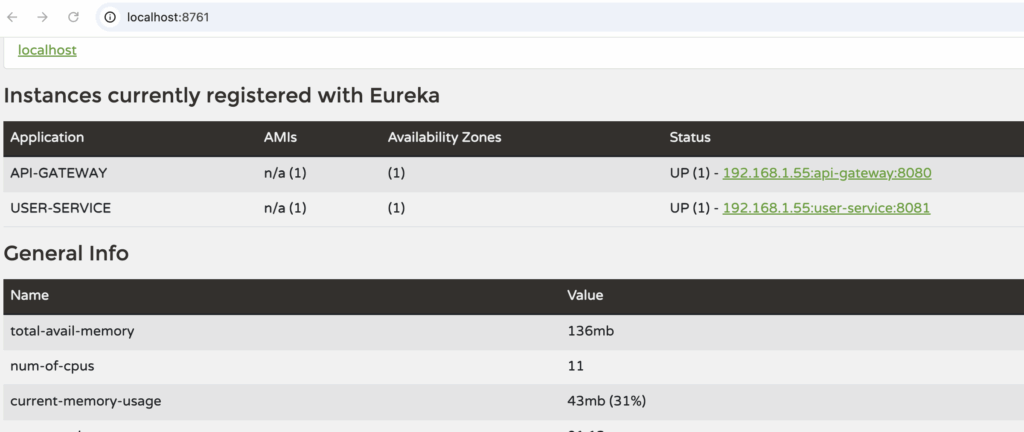
githib code link: https://github.com/infotechseo/microservices-api-gateway
This is the foundation for a powerful microservices architecture. You can add more services and configure routing, filters, authentication, rate-limiting, etc. using this gateway.

![Security with Spring Boot (Basic Auth, JWT, OAuth2) [Java Spring Boot Mastery Series – Part 10]](https://seoinfotech.com/wp-content/uploads/2025/06/jav-spring-boot-mastery--300x200.png)